Build a Real Full-Stack Website with AI in 90 Minutes
Don’t spend another evening watching tutorials.
- When
- Sat, 29 AugSaturday, 29 August 2026 · 7:00–8:30 PM IST
- Format
- Live online · 90 minutes

Sachin Anand
Founder, CoinsLive
See workshop detailsHide workshop details
Build a working website with AI + Next.js + SQL, add real database functionality, and leave the workshop with a project you can continue building, customise and show.
No expert-level coding required. Bring your laptop and build along live.
Build a working website with AI + Next.js + SQL, add real database functionality, and leave the workshop with a project you can continue building, customise and show.
No expert-level coding required. Bring your laptop and build along live.
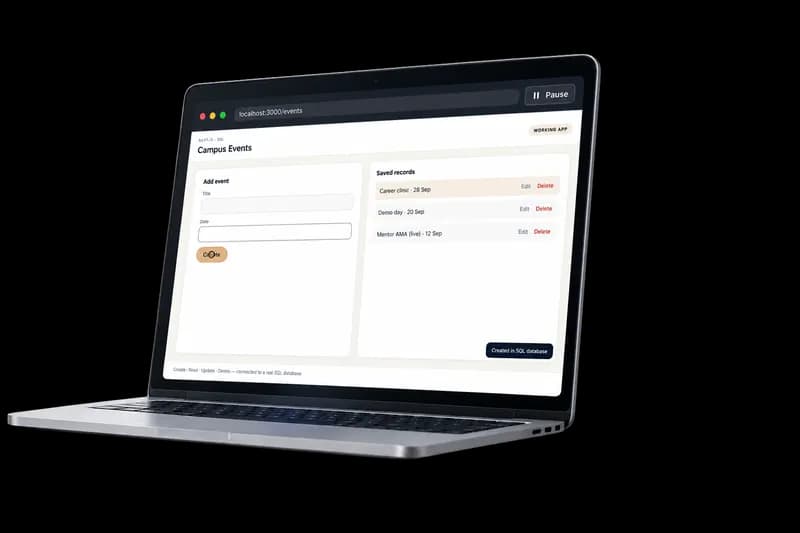
Finished application
See the finished application
A working Next.js + SQL app with Create, Read, Update and Delete — the project you build in this session.
Silent walkthrough · Create → Read → Update → Delete · loops automatically
90 Minutes. One Working Project.
By the end of this workshop, you won’t just know how a full-stack application works.
You’ll have actually built one.
Your application will be able to:
- Accept information from users
- Save information to a real SQL database
- Display saved records
- Update existing information
- Delete records
- Run on a modern Next.js stack
- Use AI to speed up development without blindly copying code
You leave with something you can continue building.
Use it as:
A portfolio project · College project · Startup prototype · Starting point for your next app
Stop Collecting Tutorials. Start Building.
Watching another 3-hour coding tutorial may make you feel like you’re learning.
But when someone asks: “What have you actually built?” you need something you can show.
This workshop is designed differently. You won’t sit and watch someone code.
You build alongside us.
We start with an idea. Then: AI → Next.js → SQL → CRUD → Working Application
And you see how all the pieces fit together.
What You’ll Learn by Actually Doing It
⚡ Build Faster With AI
Use AI to generate the first version of your application and accelerate development. But more importantly, understand what it creates, what needs to change and how to stay in control.
🎨 Turn It Into Your Website
Create the pages, sections and interface in Next.js. Then customise the content and design so it doesn’t feel like another generic AI-generated page.
🗄 Connect a Real Database
Understand how your frontend communicates with SQL and how information submitted by users gets stored.
🔄 Make It Interactive
Implement the four operations behind thousands of real applications: Create · Read · Update · Delete.
🚀 Take the Project Forward
The workshop ends after 90 minutes. Your project doesn’t. Continue improving it into a stronger portfolio project, college project, business idea or application.
Is This Workshop for You?
Join if you are:
- A college student who wants to build real projects
- Learning web development but stuck in tutorial mode
- Curious about building applications with AI
- Someone with basic programming knowledge who wants hands-on experience
- Exploring Next.js, databases or full-stack development
- Interested in turning an idea into something functional quickly
You do NOT need:
- Years of development experience
- Expertise in Next.js
- Expertise in SQL
- To be an AI expert
Basic familiarity with programming will help. Most importantly, come ready to build, not just watch.
Here’s Exactly What Happens in 90 Minutes
0–15 min
See the Finished Application
First, see exactly what you’re going to build. Understand what the application does, how the project is structured, where Next.js fits, where SQL fits, where AI helps, and what we’re going to accomplish together.
15–45 min
Build & Design the Website
Use AI to create the foundation of the Next.js application. Then customise pages, sections, layout, content, and styling. The aim isn’t to accept whatever AI generates — the aim is to build with AI without losing control.
45–75 min
Connect SQL & Make It Work
Now turn the website into an actual application. Connect the SQL database and implement Create → Read → Update → Delete. See how user information moves between the interface and database.
75–90 min
Run It. Fix It. Understand It.
Test the complete application. Fix common problems. Understand the important parts of the code. Ask questions that might otherwise stop you when you’re working alone. And leave with your working project.
What You’ll Have After the Workshop
Before
“I’ve watched tutorials on web development.”
After
“I built a full-stack application using AI, Next.js and SQL.”
You'll leave with:
- Your own Next.js website
- A connected SQL database
- Working CRUD functionality
- Understanding of the major components
- A project you can continue improving
- Practical experience using AI during development
One evening. Something real to show for it.
Why This Isn’t Another AI Coding Tutorial
There are hundreds of videos showing you how AI can generate code. That’s not the difficult part anymore.
The real questions are:
- What should you ask AI to build?
- How do you modify what it creates?
- How do the frontend and database connect?
- What do you do when the generated code doesn’t work?
- How do you turn an AI-generated prototype into something you understand?
That’s what we’ll focus on. AI should make you faster — not make you dependent on it.
Frequently asked questions
Is the workshop really free?
Yes. The regular workshop price is ₹199, and it is currently being offered free for early registrations.
What exactly will I build?
A customised Next.js website connected to a SQL database with working Create · Read · Update · Delete functionality. In other words, you’ll build a small but real full-stack application.
Do I need to know coding?
You don’t need to be an expert developer. Basic familiarity with programming will make it easier to follow, and we’ll build the application step by step during the live workshop.
I've never used Next.js. Can I join?
Yes. The purpose is not to assume you already know the complete stack. We’ll explain the important parts as we build.
Do I need to know SQL?
No. You’ll see how the database connects to the application during the workshop.
Can I use the project afterwards?
Yes. That’s one of the main purposes of the workshop. Continue developing it as a portfolio project, college project, startup prototype, or personal project.
Is this a recorded course?
No. It is a live, build-along workshop. Come with your laptop and follow the build during the session.
What should I bring?
A laptop, stable internet connection, curiosity, and willingness to code along.
How will I receive the joining link?
Register using your name, contact number and email. Workshop joining details will be sent to your registered email.

Meet your workshop host
Sachin Anand
Founder, CoinsLive
B.Tech, IIT Kanpur
Sachin will build the application live with you using AI-assisted development, Next.js and SQL. The goal isn’t to give you code to copy.
You'll see:
- What AI generates
- Why it generates it
- How the different pieces connect
- What needs to be changed
- How to debug problems
- How to continue building after the workshop
In 90 Minutes, You Can Either Watch Another Tutorial...
...or finish with something you’ve actually built.
AI + Next.js + SQL + CRUD. One live session. One working project. Something you can continue building after the workshop ends.
Saturday, 29 August 2026 · 7:00–8:30 PM IST
Live online workshop
Originally ₹199, now Free.100% discount ends in 10 hours.
FREE29 Aug
Reserve My Seat